Hardware & OS Specifications Apple • Windows • Linux • Android Release v2.4.5+2451

Compatibility & System Requirements

Clear, honest technical specifications explaining exactly how LanKinetix works across Android 8.0–16+ Phones & Foldables (Google Play Closed Testing), macOS, Windows 10/11, and Linux & Raspberry Pi OS (Free CLI & L2 Bridge now; standalone Desktop GUI opening in v2.5)—plus planned iOS/iPadOS roadmap notes.

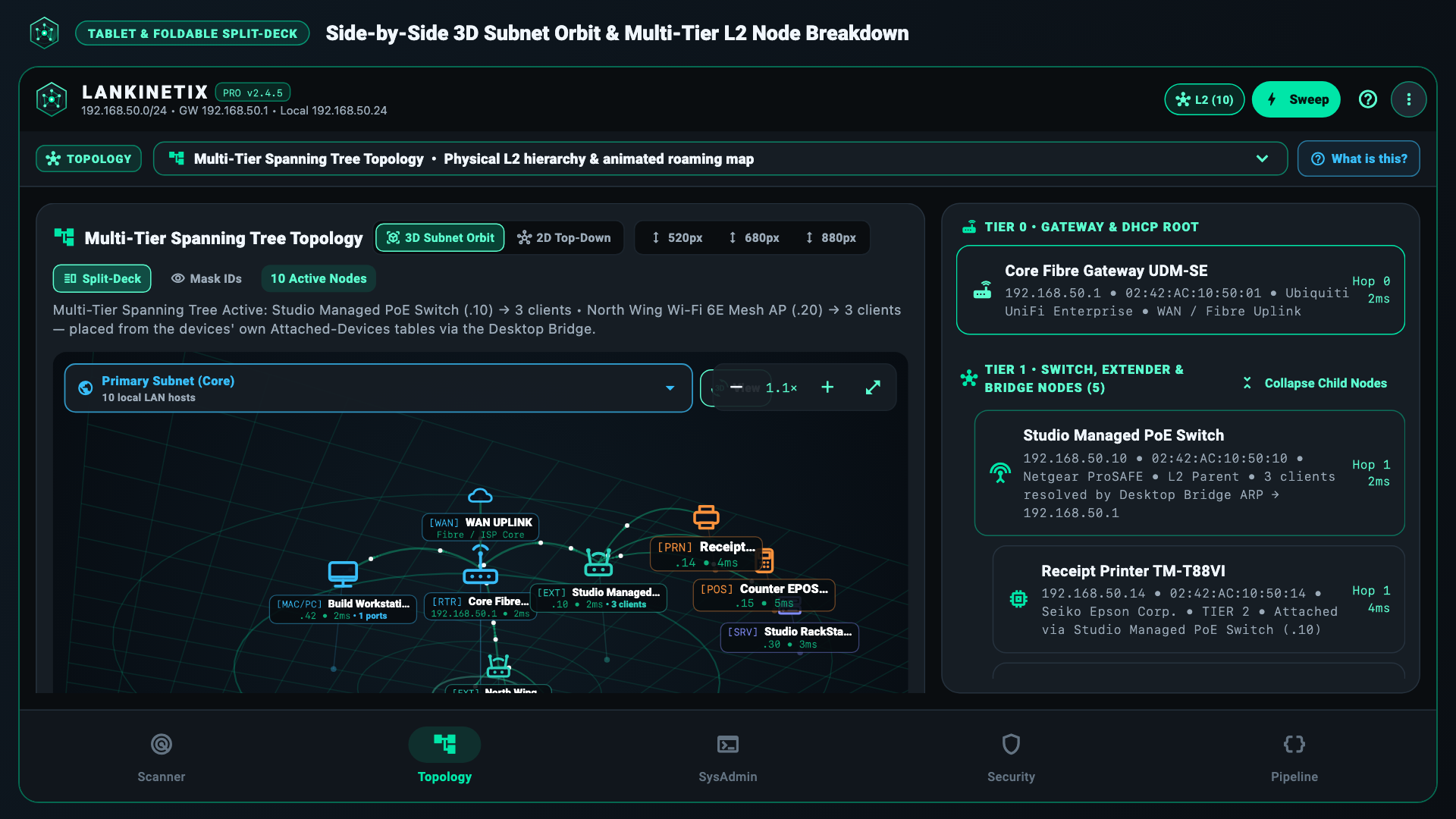
LanKinetix Widescreen Split-Deck running across Desktop, Tablet, and Foldable Displays
Part 1 • Apple Compatibility

How LanKinetix Works on Apple Systems (macOS Live • iOS Planned Roadmap)

LanKinetix supports macOS 12 Monterey through macOS 15 Sequoia+ today via the free Companion L2 Bridge / CLI (standalone Desktop GUI opens in v2.5 Waitlist). iOS / iPadOS is Planned Roadmap — not yet shipped on the App Store; the notes below document our target iOS + Bridge architecture.

Planned Roadmap — Not Yet Shipped on App Store

Planned iOS 15.0+ & iPadOS Technical Architecture

  • App Store Availability: An iOS / iPadOS client is not yet shipped on the Apple App Store. Shipped platforms today are Android 8.0+ (Closed Testing) and macOS / Windows / Linux CLI & Bridge (with Desktop GUI opening in v2.5).
  • Local Network Permission Requirement: Future iOS builds will require allowing Apple's Local Network prompt on first launch to send subnet discovery probes and listen for Bonjour / mDNS services (_airplay._tcp, _hap._tcp, _matter._tcp, _sonos._tcp).
  • Apple Sandbox MAC & RF Restrictions: Apple blocks third-party App Store apps from reading kernel ARP tables or raw Wi-Fi dBm/channel lists directly; just as on Android 10+, pairing with our free Companion L2 Desktop Bridge supplies full /24 ARP and spectrum telemetry over QR-pinned TLS.
Part 2 • Microsoft Windows Compatibility

How LanKinetix Works on Windows 10 & Windows 11

Both the Free CLI & Companion L2 Bridge (available now) and the standalone LanKinetix Desktop Edition (v2.5 Waitlist) run on 64-bit Windows 10 (21H2 or newer) and Windows 11 (Home, Pro, Enterprise) without requiring administrator rights or third-party packet drivers.

Windows Requirements & Notes

Important Windows Setup Details & OS Limits

  • Windows Defender Firewall Prompt: When starting the Companion L2 Bridge or clicking Pair Mobile Phone (QR), allow LanKinetix through Windows Defender Firewall on Private Networks (TCP port 8787 and UDP discovery port 8786) so your phone can connect over Wi-Fi.
  • Desktop PCs Connected via Ethernet Only: If your Windows desktop PC has no Wi-Fi card and is plugged in via Ethernet cable, full /24 LAN device discovery, hardware MAC resolution, 2D/3D topology mapping, port auditing, and QR phone bridging work 100%—while Wi-Fi spectrum scanning is performed by your paired phone.
  • No Raw 802.11 Monitor-Mode Capture (/api/airspace) on Windows: Standard Windows NDIS Wi-Fi drivers do not support tcpdump -I monitor-mode frame capture. All standard Wi-Fi BSSID/channel scanning (netsh wlan) works normally, while raw 802.11 client frame capture is supported on macOS and Linux bridges.
  • App Data Storage Location: Stores local state and bridge credentials privately under %APPDATA%\LanKinetix\.
Part 3 • Linux & Raspberry Pi OS Compatibility

How LanKinetix Works on Linux Desktops, Servers & Raspberry Pi

Engineered for 64-bit (x86_64 and aarch64 / arm64) Linux distributions including Ubuntu 20.04/22.04/24.04 LTS, Debian 11/12, Fedora 38+, Linux Mint, Arch Linux, and Raspberry Pi OS (64-bit).

Linux Packages & Permissions

Recommended Linux Packages & Optional Capabilities

  • GTK 3 Desktop Runtime (For v2.5 Desktop GUI Edition): Standalone Desktop GUI builds (v2.5 Waitlist) require standard libgtk-3-0 (gtk+-3.0) on X11 or Wayland desktop environments (GNOME, KDE Plasma, XFCE, Sway, Hyprland); the CLI & Bridge require no display server.
  • Headless Server / Raspberry Pi Companion Bridge: The CLI and Companion L2 Bridge require zero X11/Wayland display server—making a Raspberry Pi 4 or Pi 5 an ideal always-on 24/7 L2 Bridge for your mobile phone.
  • Optional Raw 802.11 Station Capture (tcpdump -I): To use on-demand 802.11 client station capture without running the entire bridge as root, grant packet capture capabilities to tcpdump: sudo setcap cap_net_raw,cap_net_admin=eip $(which tcpdump).
  • Local Firewall (ufw / firewalld): If a host firewall is active, allow local subnet access to 8787/tcp and 8786/udp (sudo ufw allow from 192.168.0.0/16 to any port 8787 proto tcp).
Part 4 • Android 8.0–16+, Foldables & Network Equipment

Android Phones, Foldables, Routers & Printer Safe-Mode

LanKinetix (com.asai.lankinetix) supports every unrooted Android phone, foldable, and tablet running Android 8.0 Oreo (API 26) through Android 16 (API 36).

Platform / Operating System Minimum Version Full /24 Hardware MAC & OUI Discovery 2.4 / 5 / 6 GHz Wi-Fi Spectrum & 1 Hz Walk-Test 802.11 Monitor-Mode Station Radar
Android Phones, Foldables & Tablets
Android 8.0 – 16+ (API 26–36)
Android 8.0 (No root required; ARM64, ARMv7, x86_64) Standalone L3/L7 (mDNS / UPnP / NetBIOS) + 100% Full /24 ARP when paired with Free L2 Bridge 100% Native (6 GHz requires Wi-Fi 6E/7 phone radio + Android Location / Nearby Wi-Fi permission) Via Paired macOS or Linux L2 Bridge (/api/airspace)
Apple macOS
macOS 12 Monterey – 15 Sequoia+
macOS 12.0+ (Apple Silicon M1–M4 & Intel) 100% Native Kernel ARP (arp -an + router attach_dev mesh parent tree) 100% Native (CoreWLAN / system_profiler; requires macOS Location Services for SSID/BSSID) Supported (tcpdump -I with BPF read access)
Microsoft Windows
Windows 10 (21H2+) & Windows 11
64-Bit Windows 10 / 11 (No Npcap driver needed) 100% Native Kernel ARP (arp -a + router attach_dev mesh parent tree) 100% Native (Multi-locale netsh wlan on PCs with a Wi-Fi adapter) Not supported by standard Windows NDIS drivers
Linux & Raspberry Pi OS
Ubuntu, Debian, Fedora, Arch, Pi OS
64-Bit Linux (glibc 2.31+, iproute2, nmcli or iw) 100% Native Kernel ARP (ip -4 neigh / /proc/net/arp + mesh parent tree) 100% Native (nmcli with automatic iw dev scan/link fallback) Supported (tcpdump -I with sudo or CAP_NET_RAW)
Apple iOS & iPadOS
Planned Roadmap • Not Yet Shipped
Not yet shipped on App Store (planned target: iOS/iPadOS 15.0+ with Local Network prompt) Planned: Standalone L3/L7 (mDNS / UPnP / NetBIOS) + Full /24 ARP via Free L2 Bridge Planned: Requires Paired Companion L2 Bridge (iOS blocks direct public RSSI/channel scan APIs) Planned: Via Paired macOS or Linux L2 Bridge (/api/airspace)
Routers & Mesh Wi-Fi

Works With Every Router & Mesh System

  • ISP Routers: BT Smart Hub, Sky Max Hub, Virgin Media Hub 3/4/5, EE, Vodafone, Fritz!Box, Xfinity, AT&T.
  • Mesh Wi-Fi: TP-Link Deco, Amazon eero, Google Nest Wifi, Netgear Orbi, ASUS AiMesh, Linksys Velop.
  • Prosumer VLANs: Ubiquiti UniFi, MikroTik, Omada, pfSense / OPNsense, DrayTek, GL.iNet.
Foldables & Widescreen

Dual-Pane Split-Deck Posture Support

  • Foldable Phones: Samsung Galaxy Z Fold 3/4/5/6, Google Pixel Fold / 9 Pro Fold, OnePlus Open, Honor Magic V2/V3.
  • Tablets & Monitors: Android tablets (e.g., Samsung Galaxy Tab S, Google Pixel Tablet) and 1440×900+ desktop displays (Desktop GUI in v2.5 Waitlist).
  • Zero-Reload Unfolding: Smooth 520ms topology re-interpolation when unfolding your screen.
Hardware Safe-Mode

Printers & EPOS Terminals Protected

  • Automatic Port Quarantine: Never sends active payloads to ports 9100–9102, 8080, or 8081.
  • Office & Receipt Printers: Safe with HP JetDirect, Brother, Epson, Canon, Zebra, and Star Micronics thermal printers.
  • Payment Terminals: Protects retail and hospitality EPOS card terminals from socket lockups.
Image 1 of 1