Complete Feature Directory Release v2.4.5+2451 Mobile (Closed Testing) • Free CLI • Desktop GUI (v2.5 Waitlist)

Every Feature Inside LanKinetix

Explore the complete capability list across our Android & Foldable App (Google Play Closed Testing), the Free Command-Line Interface (CLI) & Companion L2 Desktop Bridge, and the standalone Desktop Edition (v2.5 Early Access Waitlist). Built for everyday clarity as well as deep engineering diagnostics—100% locally with zero subscriptions.

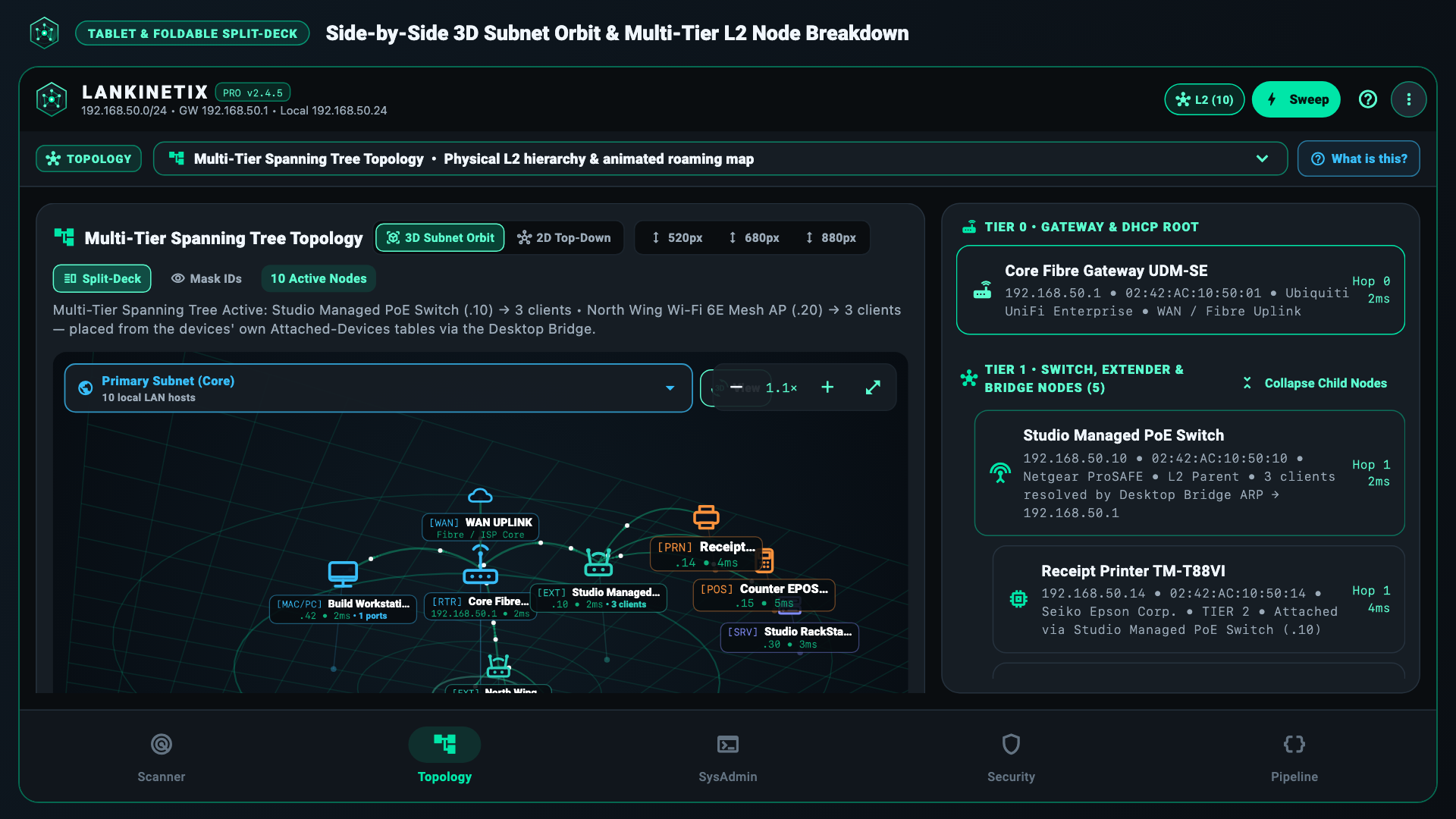
LanKinetix Widescreen Split-Deck View showing Device Discovery, 2D/3D Topology, and Diagnostic Inspector
Category 1 • Scanner & Device Inventory

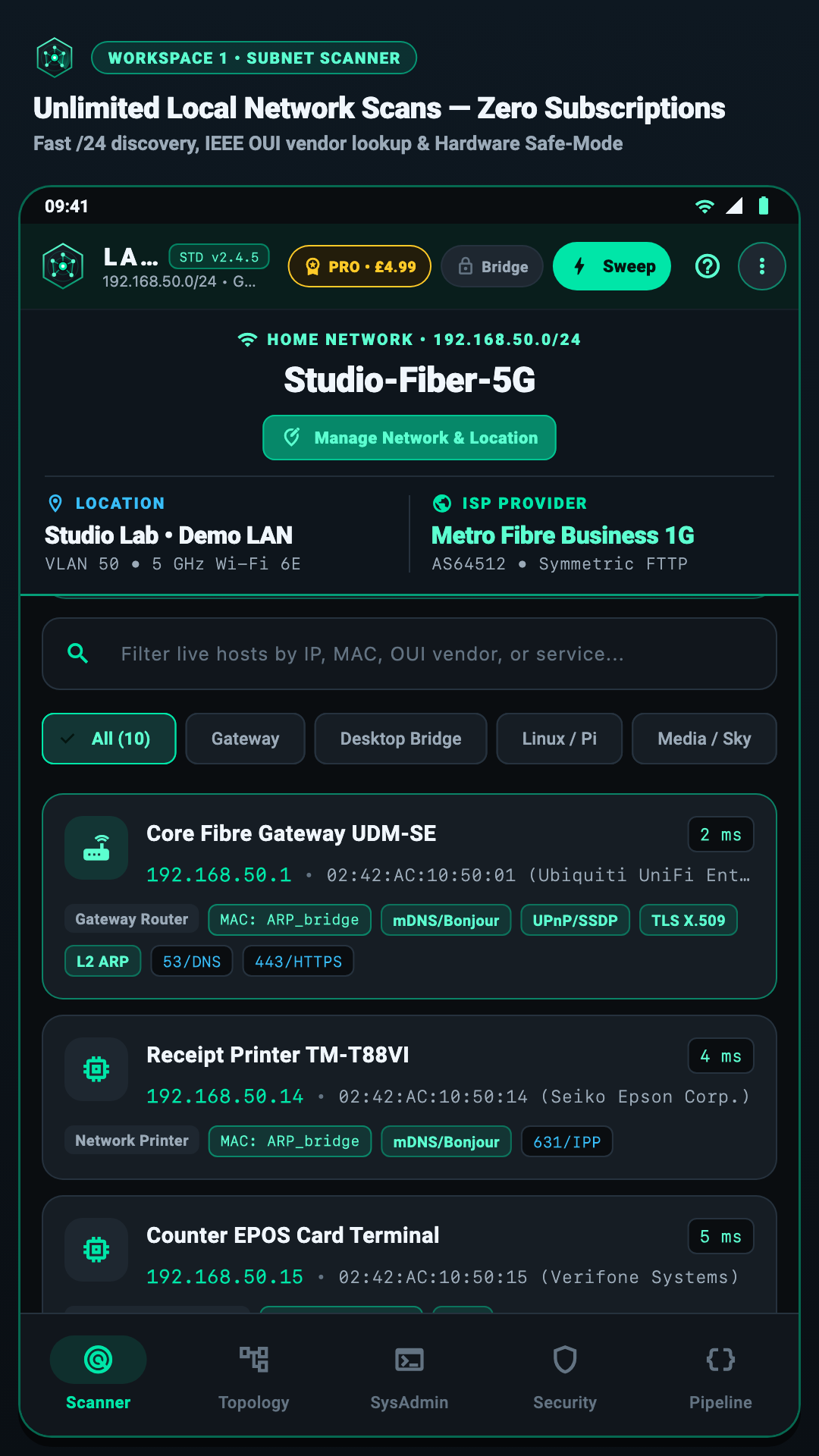
Smart Device Discovery & Hardware Fingerprinting

Most mobile scanners miss phones in deep sleep or confuse smart-home gadgets with generic IP addresses. LanKinetix combines six local discovery engines to find and name every device accurately.

Hardware Protection & Provenance

Printer Safe-Mode & MAC Provenance Badges

LanKinetix Passive Smart-Home Discovery and Printer Safe-Mode Screenshot
  • Automatic Printer Safe-Mode Exclusion Gate: Detects thermal receipt printers, JetDirect laser printers, and EPOS terminals before deep port probing—permanently quarantining raw TCP ports 8080, 8081, and 9100–9102 (plus skipping deep banner payloads on 515/631 for detected printers) so printers never spit out pages of garbage text.
  • Clear MAC Address Provenance Badges: Shows exactly how each hardware address was verified—whether via the L2 Desktop Bridge (BRIDGE-ARP), multicast announcement (MDNS-MAC), kernel ARP table, or Android randomized Wi-Fi privacy mode.
  • Randomized Private MAC Detection: Automatically flags devices using locally administered randomized MAC addresses (iOS Private Wi-Fi Address / Android Randomized MAC) so you know when a phone is masking its hardware ID.
  • Adaptive Congestion-Safe Pacing: Dynamically adjusts scan concurrency based on live gateway round-trip latency so your video calls and gaming streams never stutter during a scan.
  • New & Unknown Device Highlighting: Clearly badges first-seen devices joining your Wi-Fi since your last baseline snapshot.
  • Cross-Subnet Guest VLAN /24 Discovery: Probes candidate private guest gateways (192.168.x.1, 10.x.x.1, and 172.16–31.x.1) when router client isolation separates guest Wi-Fi VLANs from the main LAN.
Category 2 • Interactive Network Mapping

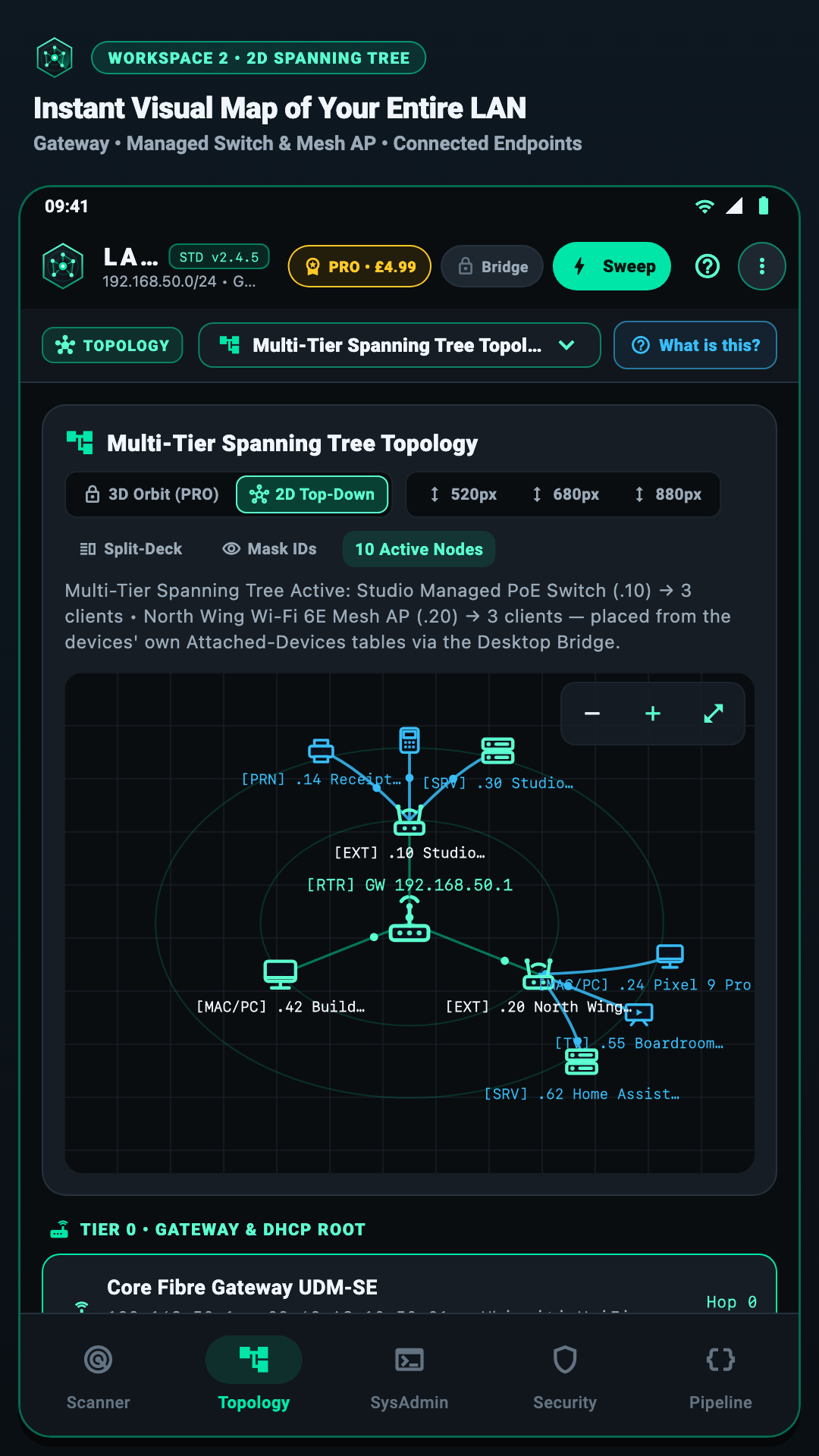
2D & 3D Force-Directed Topology & Foldable Split-Deck

Stop scrolling through flat IP tables. See how your router, mesh boosters, switches, and wireless devices connect in an interactive, colour-coded visual map.

2D & 3D Physics Canvas

Interactive 60fps 2D & 3D Network Map

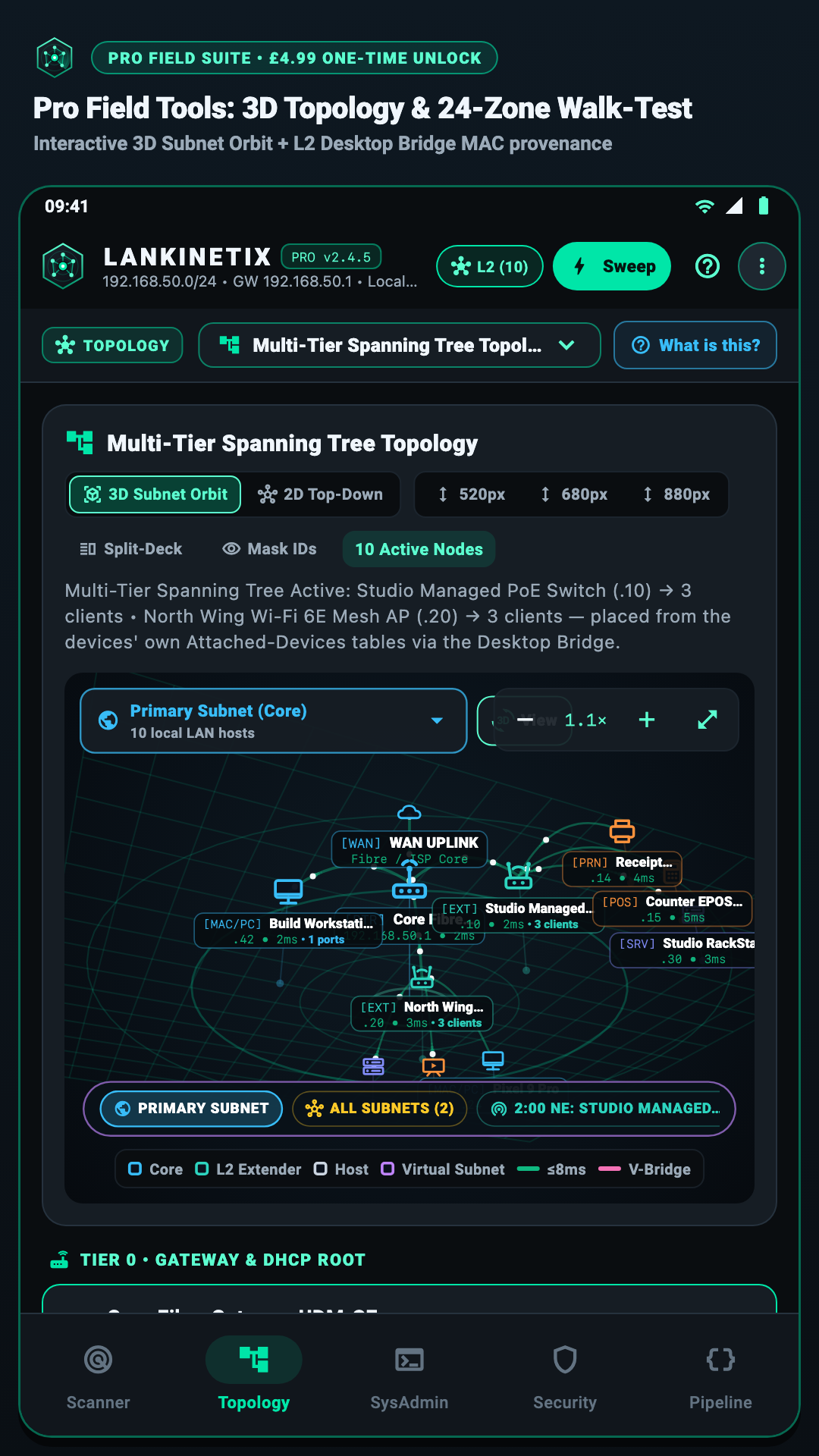
LanKinetix Interactive 2D and 3D Force-Directed Topology Map Screenshot
  • 1-Tap 2D Planar & 3D Perspective Orbit: Switch seamlessly between a crisp 2D floor diagram and a rotatable 3D orbital topology view with pinch-to-zoom and pan gestures.
  • Live Latency & Signal Colour Coding: Links and nodes glow mint green for healthy low-latency connections, amber for moderate congestion, and coral red for weak Wi-Fi or packet drops.
  • Gateway & Primary Router Auto-Centering: Automatically anchors your main internet gateway at the centre of the graph and radiates connected devices outward by role and hop distance.
  • Mesh Booster & Access Point BSSID Grouping: When paired with the free L2 Bridge or Wi-Fi BSSID telemetry, groups devices under the exact mesh node or access point radio they are connected to.
  • Tap-to-Inspect Node Drawer: Tap any node in the 2D or 3D graph to open its live latency sparkline, open services, manufacturer details, and quick ping/Wake-on-LAN actions.
Foldable, Tablet & Desktop Widescreen

Adaptive Dual-Pane Split-Deck Workspace

LanKinetix Tablet and Foldable Dual-Pane Split-Deck Screenshot
  • Built for Samsung Galaxy Z Fold, Pixel Fold & Tablets: Automatically expands into a side-by-side multi-panel command deck when you unfold your phone or run on a tablet or desktop monitor.
  • Simultaneous Map + Live Device Inspector: Keep the interactive 2D/3D network topology open on the left while inspecting device ports, latency graphs, and room signal metrics on the right.
  • Zero-Reload Posture Transitions: Unfolding or rotating your device preserves your active scan state, selected host, and walk-test session without restarting or losing data.
  • High-Contrast NOC Dark OLED Theme: Engineered with crisp mint, amber, and coral telemetry contrast and tabular numerals so every IP, MAC, and dBm reading is effortless to read on site.
Category 3 • Wi-Fi Signal Survey & Spectrum Equalizer

1 Hz Room-by-Room Walk-Test & 2.4 / 5 / 6 GHz Channel Equalizer

Find out in 30 seconds whether slow Wi-Fi is caused by a weak signal in a back bedroom, a sticky mesh booster, or a neighbour's router crowding your channel.

Live Dead-Zone Finder

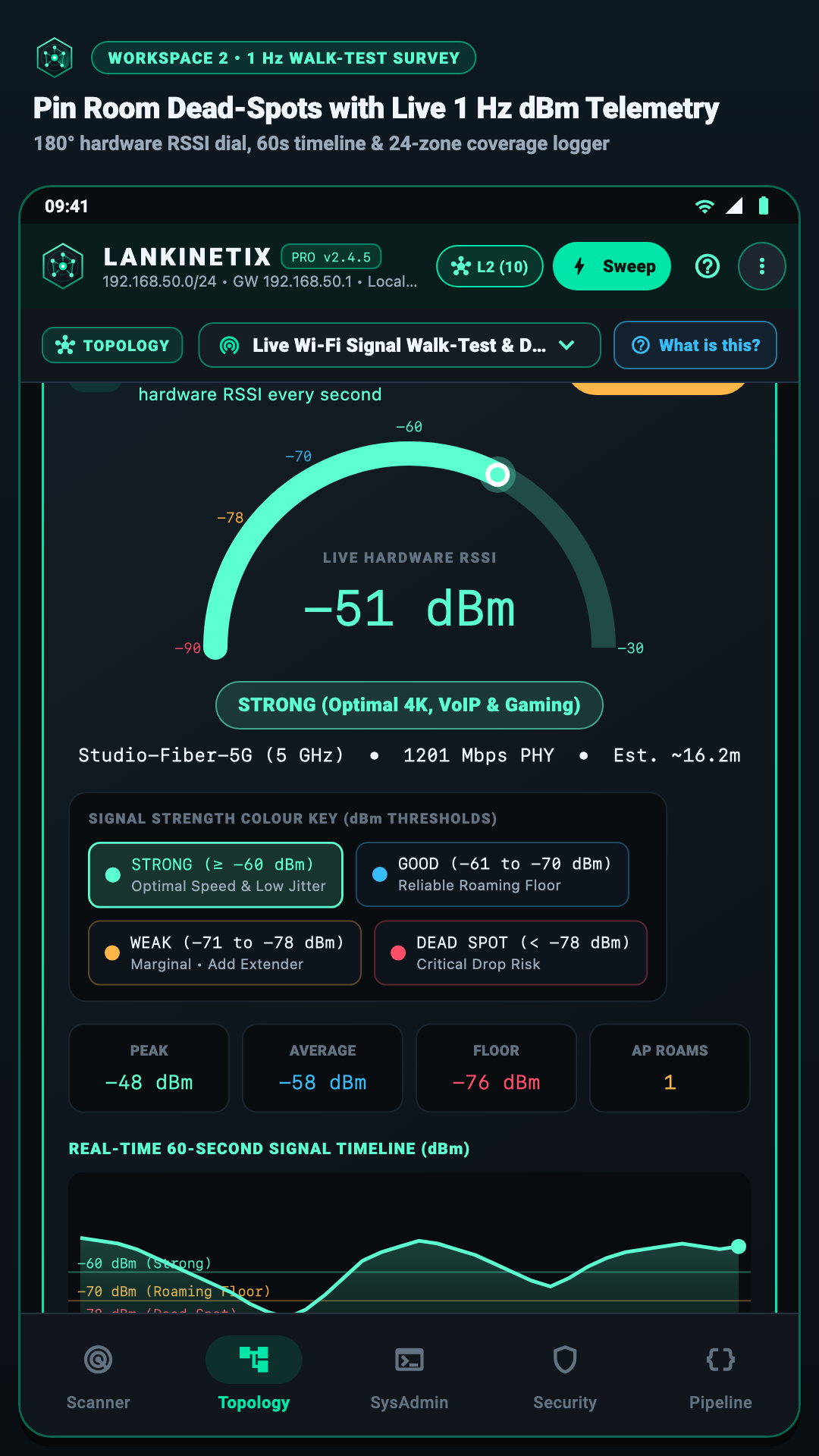
1 Hz Room-by-Room Walk-Test Meter

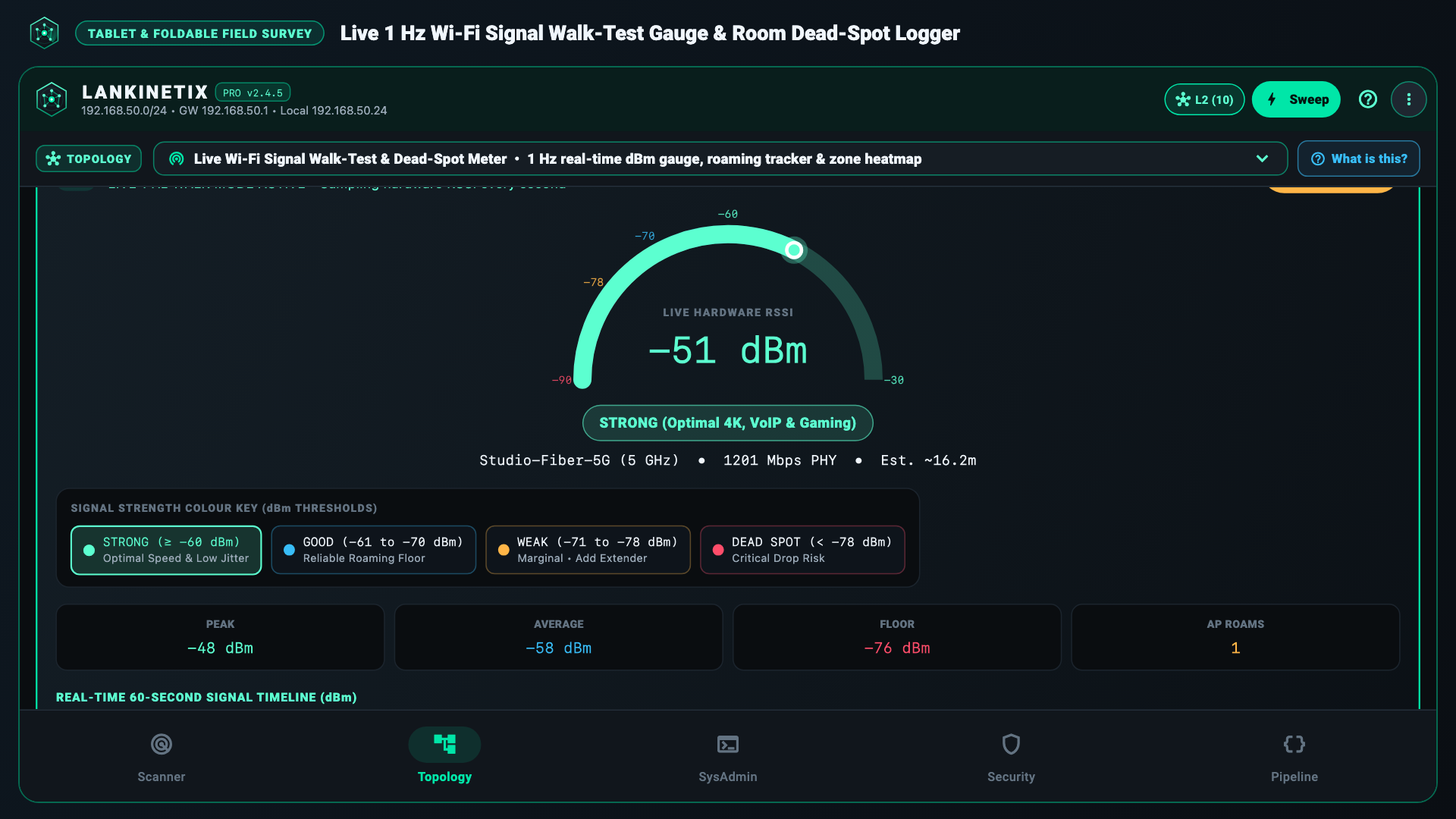
LanKinetix 1 Hz Room Walk-Test Signal Meter Screenshot
  • Real-Time 1 Hz Signal & Link Telemetry: Samples Wi-Fi RSSI (dBm), link speed (Mbps), Wi-Fi frequency/band, and gateway ping status every second as you walk from room to room.
  • Plain-English Signal Quality Grades: Translates raw -45 dBm to -85 dBm figures into clear PASS / GOOD / MARGINAL / FAIL ratings for streaming, calls, and gaming.
  • Mesh Roaming Handoff Detection: Alerts you the moment your phone hops from one mesh booster BSSID to another so you can verify smooth roaming.
Multi-Room Floor Survey

24-Room Waypoint Logger & Heatmap Table

LanKinetix Multi-Room Walk-Test Survey Comparison View
  • Tag Up to 24 Rooms or Office Zones: Tap preset room chips (Living Room, Kitchen, Loft Office, Garden Studio) or type custom labels to log signal snapshots at each spot.
  • Side-by-Side Room Comparison: Captures zone name, SSID, BSSID, 1 Hz RSSI (dBm), link rate (Mbps), frequency band, and automated PASS / GOOD / MARGINAL / FAIL verdict per room.
  • Before & After Booster Placement Proof: Re-run a walk-test after moving your router or adding a mesh node to prove coverage improved.
Airspace & Channel Analyzer

2.4 / 5 / 6 GHz Wi-Fi Channel Equalizer

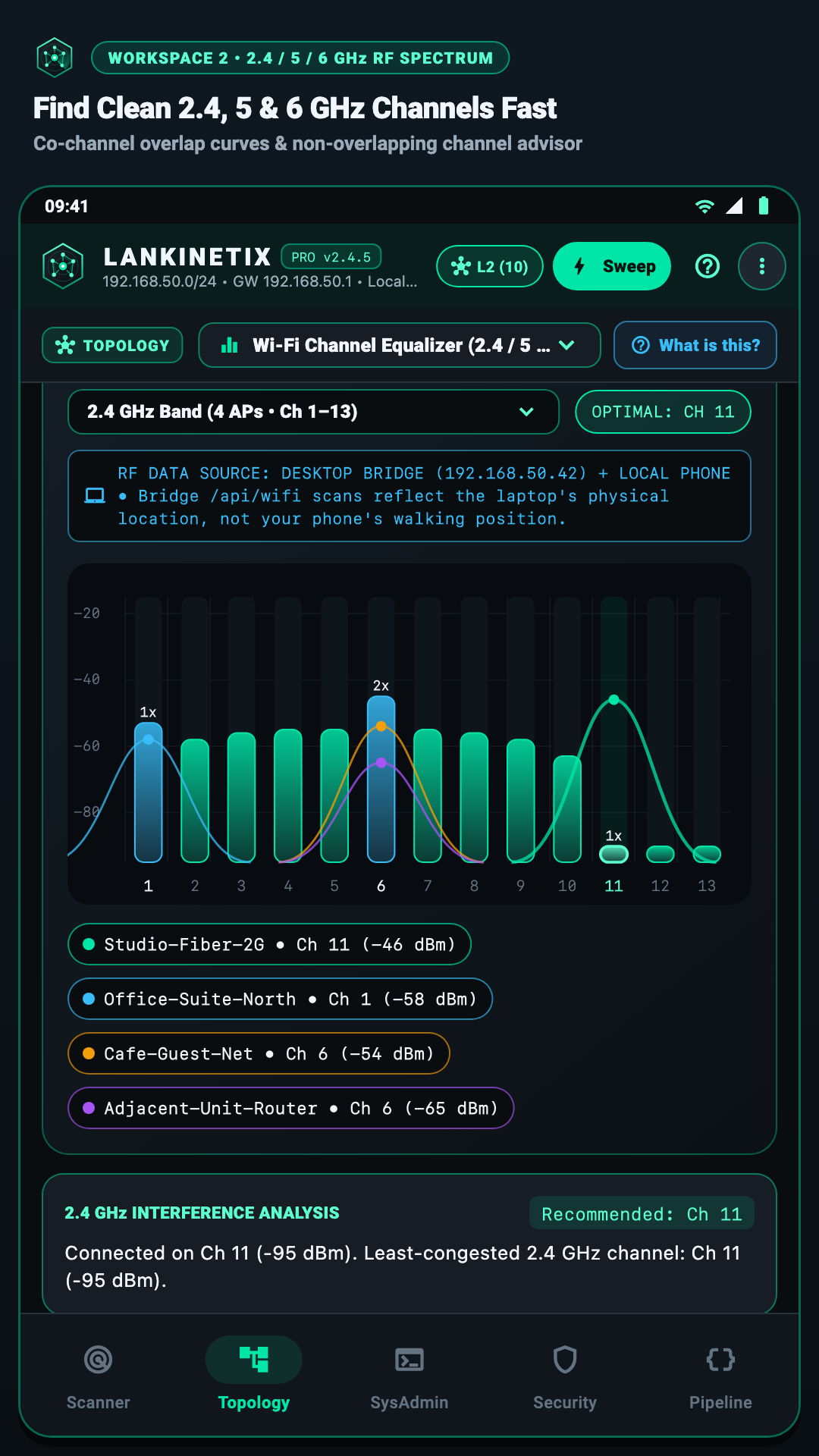
LanKinetix 2.4, 5, and 6 GHz Wi-Fi Channel Equalizer Screenshot
  • Tri-Band Spectrum Visualization: Charts overlapping Wi-Fi networks across 2.4 GHz (channels 1–13), 5 GHz (UNII-1 to UNII-3), and 6 GHz Wi-Fi 6E / Wi-Fi 7.
  • Co-Channel & Adjacent-Channel Interference Scoring: Calculates congestion weight from neighbouring routers sharing or bleeding into your channel width (20/40/80/160 MHz).
  • Best Channel Recommendation Engine: Highlights the cleanest non-overlapping channel to switch your router to for instant interference relief.
Category 4 • Security Auditing & SysAdmin Toolkit

Home & Office Security Checks, Speedometer & SysAdmin Tools

Verify that your router and smart devices aren't exposing risky ports, test your true internet speed vs. Wi-Fi speed, and wake or diagnose computers remotely.

Security Workspace

Port Exposure Audits, Rogue Gateway Checks & MAC Blocklists

LanKinetix Security Audit Workspace Screenshot
  • Risky Open Port & Service Auditor: Checks discovered devices for unencrypted or legacy management ports (Telnet 23, FTP 21, unauthenticated HTTP 80, SMB 445, RDP 3389, VNC 5900, RTSP camera streams 554) and explains what each port means in plain English.
  • Gateway ARP & Rogue DHCP Spoofing Watch: Verifies that your default gateway MAC address stays consistent and warns you if a second device attempts to impersonate your router.
  • Unknown Intruder Quarantine & Router MAC ACL Generator: Flag unfamiliar devices and generate copy-ready MAC address allow/block lists formatted for popular home and small-business routers.
  • Per-Host Security Risk Scoring: Summarizes exposed services and unencrypted banners into a clear Low / Medium / High attention indicator.
SysAdmin & Speedometer Workspace

3-Zone Glowing WAN Speedometer, Wake-on-LAN & Ping Tools

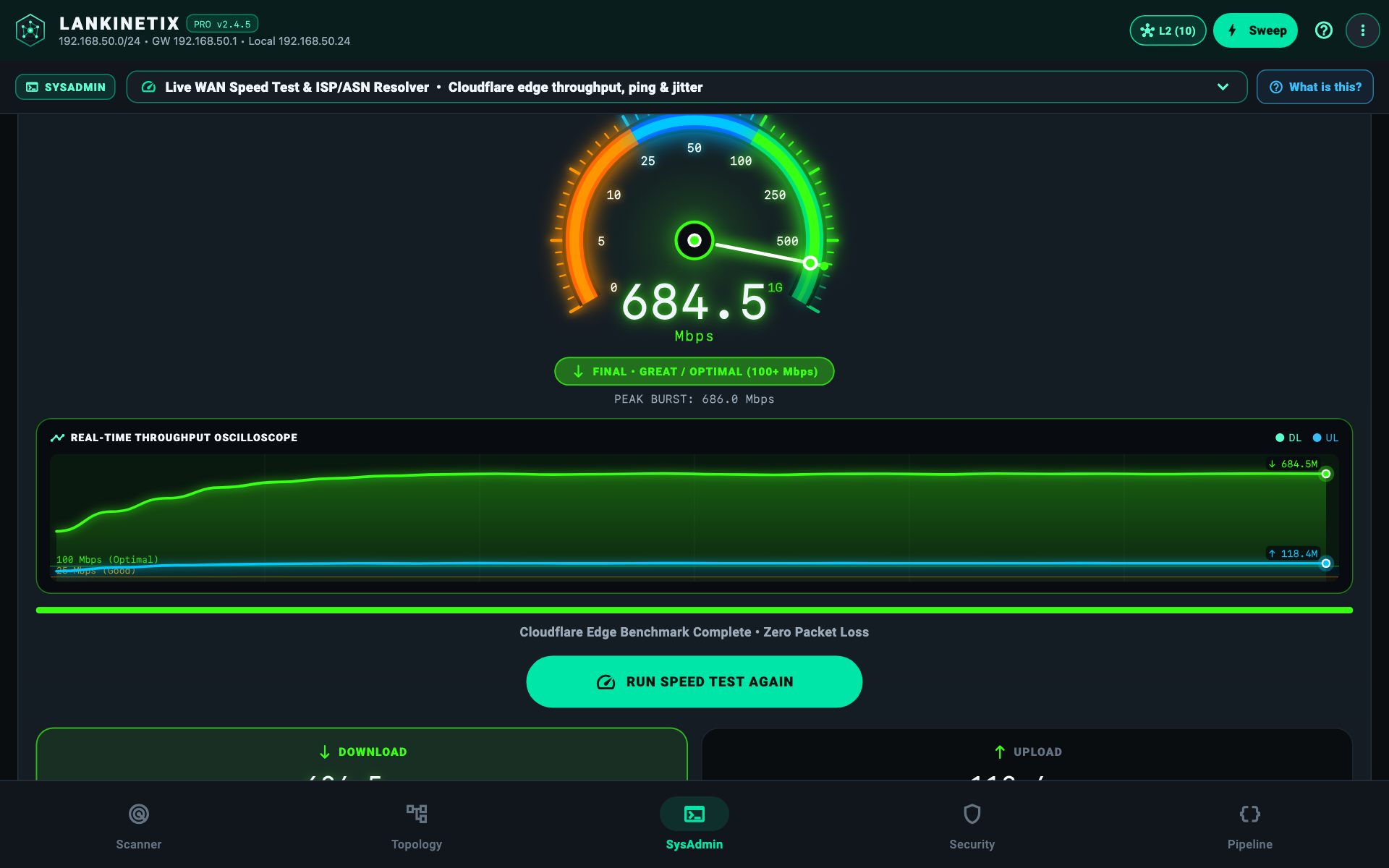
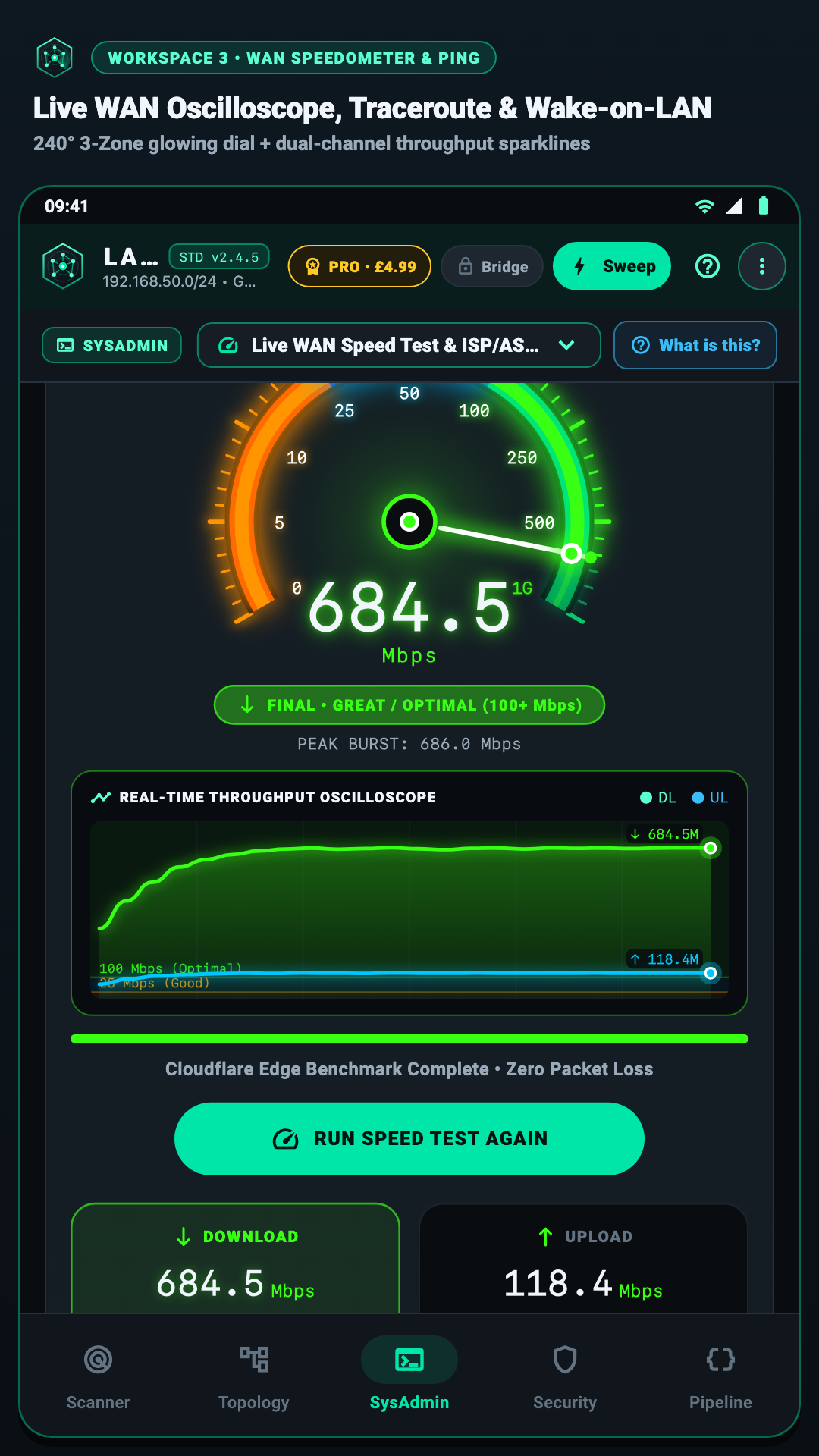
LanKinetix SysAdmin Toolkit and 3-Zone Glowing Speedometer Screenshot
  • 3-Zone Glowing WAN Speedometer: Measures download throughput, upload throughput, unloaded ping, and loaded bufferbloat jitter across a calibrated 3-zone arc gauge.
  • Router-to-Phone vs. ISP Bottleneck Comparison: Compares your local Wi-Fi link speed against your external internet speed so you know immediately whether your ISP or your Wi-Fi router is the bottleneck.
  • 1-Tap Wake-on-LAN (WoL) Magic Packet Sender: Wake sleeping desktop PCs, home servers, and NAS drives remotely over UDP broadcast port 9 / 7 with saved MAC profiles.
  • Continuous Ping, TCP Port Ping & Traceroute: Run live latency graphs, multi-hop traceroutes, and custom TCP port reachability tests against any local or remote host.
  • Local & Upstream DNS Benchmark: Test DNS resolution speed across your router's resolver, Cloudflare, Quad9, and Google DNS.
Category 5 • Free Companion L2 Desktop Bridge & CLI

Companion L2 Bridge (lankinetix.bridge.v3) & Command-Line Interface

Modern Android 11+ privacy rules block apps from reading full hardware MAC tables directly. Our free, open-protocol computer companion solves this in one QR scan—and doubles as a standalone terminal scanner for macOS, Linux, and Windows.

Standalone Terminal CLI

Scriptable Command-Line Interface for Mac, Linux & Windows

LanKinetix Command-Line Interface and Companion L2 Bridge Terminal Output
  • 100% Free macOS Binary & Cross-Platform Dart Bundle: Download the compiled macOS binary (lankinetix-cli-v2.4.5-darwin-x86_64, running on Intel and Apple Silicon via Rosetta 2) or run/compile the Dart SDK CLI source bundle on Linux (x64 & ARM64), Windows (x64), and Raspberry Pi.
  • Clean JSON & Tabular Terminal Output: Query /api/health, /api/arp, /api/wifi, /api/airspace, and /ws for automated network monitoring, cron jobs, or CI scripts.
  • Deterministic POSIX Exit Codes: Returns 0 for healthy execution, 1 for runtime/socket errors, and 2 for invalid CLI flags (such as out-of-range ports or invalid bind addresses).
  • 1-Command Token Rotation (--rotate-token): Instantly invalidate old mobile pairings and generate a fresh 128-bit shared secret and QR code whenever needed.
  • Strict Local File Permissions (0700 / 0600): Automatically locks ~/.config/lankinetix/ (or %APPDATA%\LanKinetix\ on Windows) credentials so other local user accounts cannot read your bridge token or TLS private key.
Category 6 • Exports, Home Assistant & Privacy Architecture

1-Tap Audit Exports & 100% Local-First Privacy

Share clean diagnostic reports with your ISP, import your device inventory into Home Assistant, or redact sensitive Wi-Fi names before sharing a screenshot—all without ever touching a cloud server.

Multi-Format Reporting

Printable PDF, CSV, JSON & Home Assistant Exports

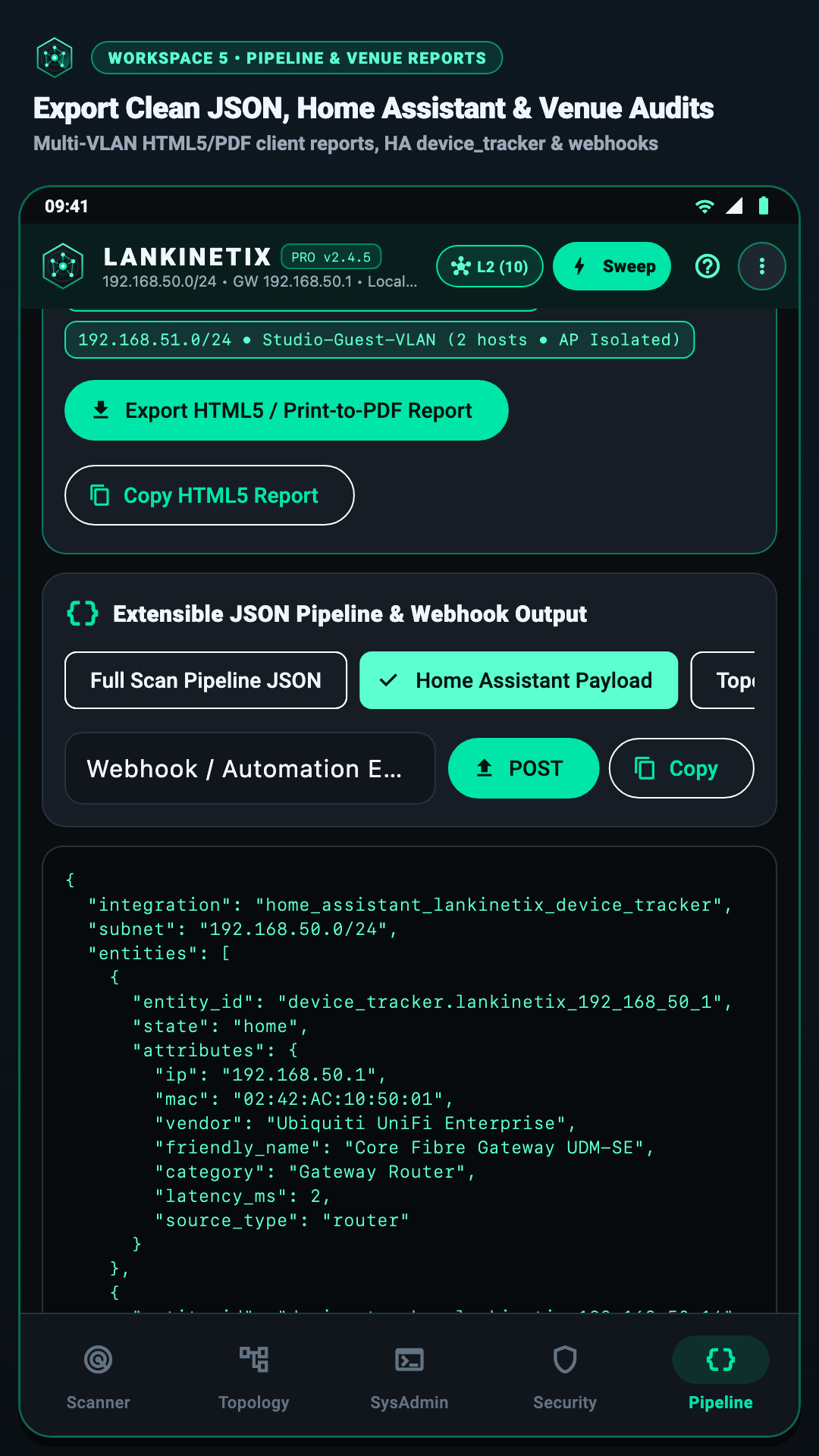
LanKinetix PDF, CSV, JSON, and Home Assistant Export Screenshot
  • Printable PDF Venue & Dead-Zone Reports: Generate clean, client-ready PDF summaries containing your network identity header, full device inventory, security findings, and 24-room walk-test coverage table.
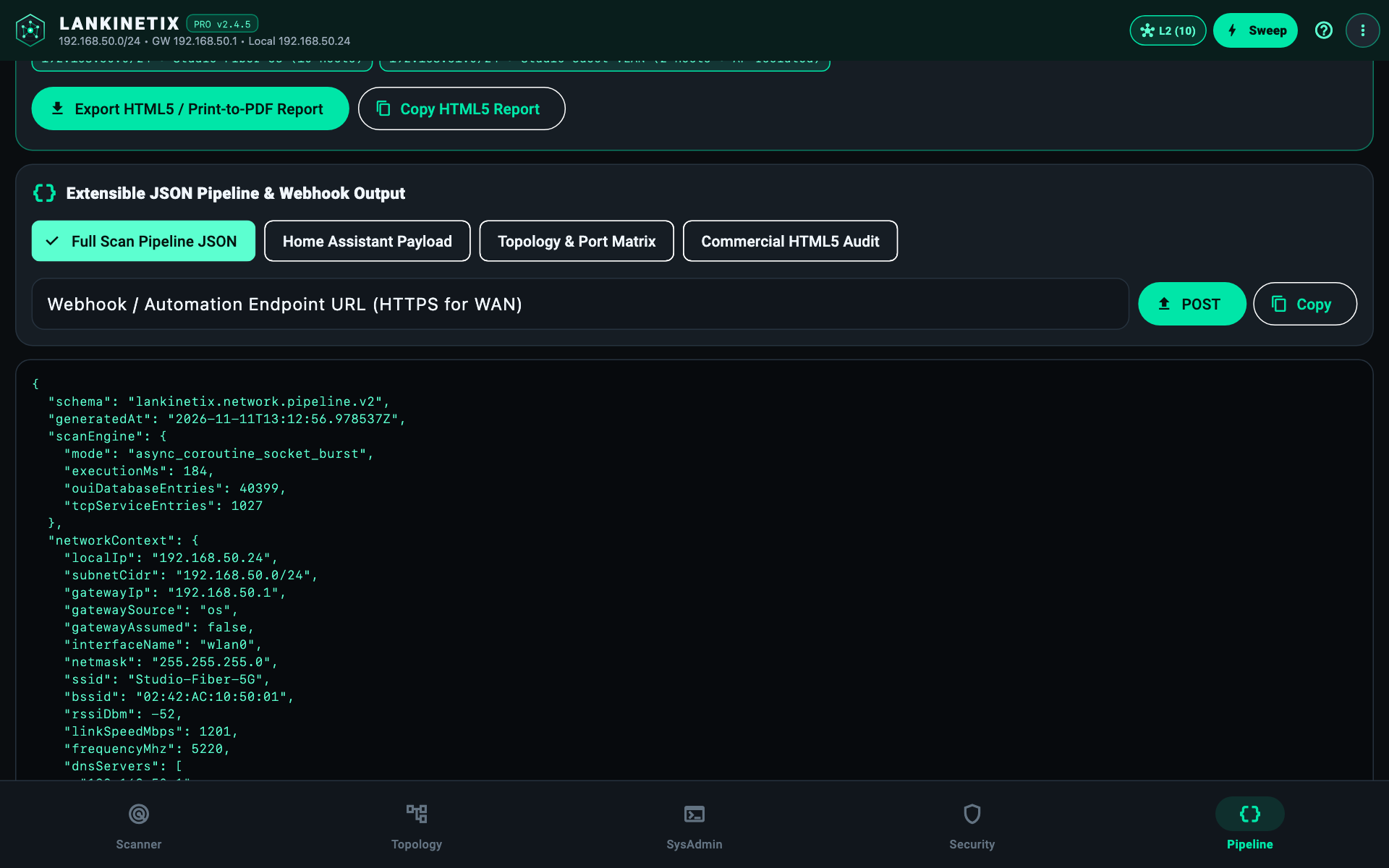
  • Home Assistant Discovery Export: Export discovered smart devices, static IP reservations, and MAC addresses into structured JSON (home_assistant_lankinetix_device_tracker) ready for Home Assistant integration.
  • Spreadsheet CSV & Schema-Validated JSON (lankinetix.network.pipeline.v2): Export full host tables into Excel, Google Sheets, NetBox, or custom IT asset management pipelines.
  • Router MAC Filter & DHCP Reservation Lists: Export copy-ready MAC/IP bindings to lock down static IPs on your router in seconds.
2-Tier Privacy Gate

Zero Cloud Telemetry, SSID Redaction & Strict LAN-Only Mode

LanKinetix Pro 3D Perspective Orbit Topology and Local-First Privacy Architecture Screenshot
  • Zero Cloud Accounts & Zero Developer Tracking: No sign-up wall, no Firebase/Crashlytics tracking, no advertising IDs, and zero developer server uploads — ASAI collects nothing (Google Play Data Safety declares only standard Google SDK Device or other IDs & Diagnostics for on-device ML Kit barcode scanning and Google Play Billing).
  • 100% Local ISP Identification by Default: Infers your ISP locally from your router's OUI vendor, hostname, and SSID pattern without sending a single packet to the public internet.
  • Strict LAN-Only Mode Toggle: Blocks all non-RFC1918 external sockets in software for air-gapped labs, studios, and high-security corporate networks.
  • 1-Tap Screenshot Privacy Redaction: Mask your Wi-Fi SSID, public IP, and lower MAC octets (AA:BB:CC:XX:XX:XX) before sharing screenshots on forums or with support teams.
Complete Feature Matrix

Every Feature Across All Four Editions

No recurring subscriptions. Compare what is included in the free tiers versus our one-time lifetime unlocks.

Capability / Feature CLI & L2 Bridge
Free
Android Standard
Free
Android Pro Unlock
£9.99 • £4.99 Launch Offer
Desktop Edition
£29 Once • v2.5 Waitlist
Multi-Method LAN Device Discovery (ARP, ICMP, TCP, UDP Wake-Up) Included (OS Native) Included Included Included
40,399+ Offline IEEE OUI Hardware Brand Database Included Included Included Included
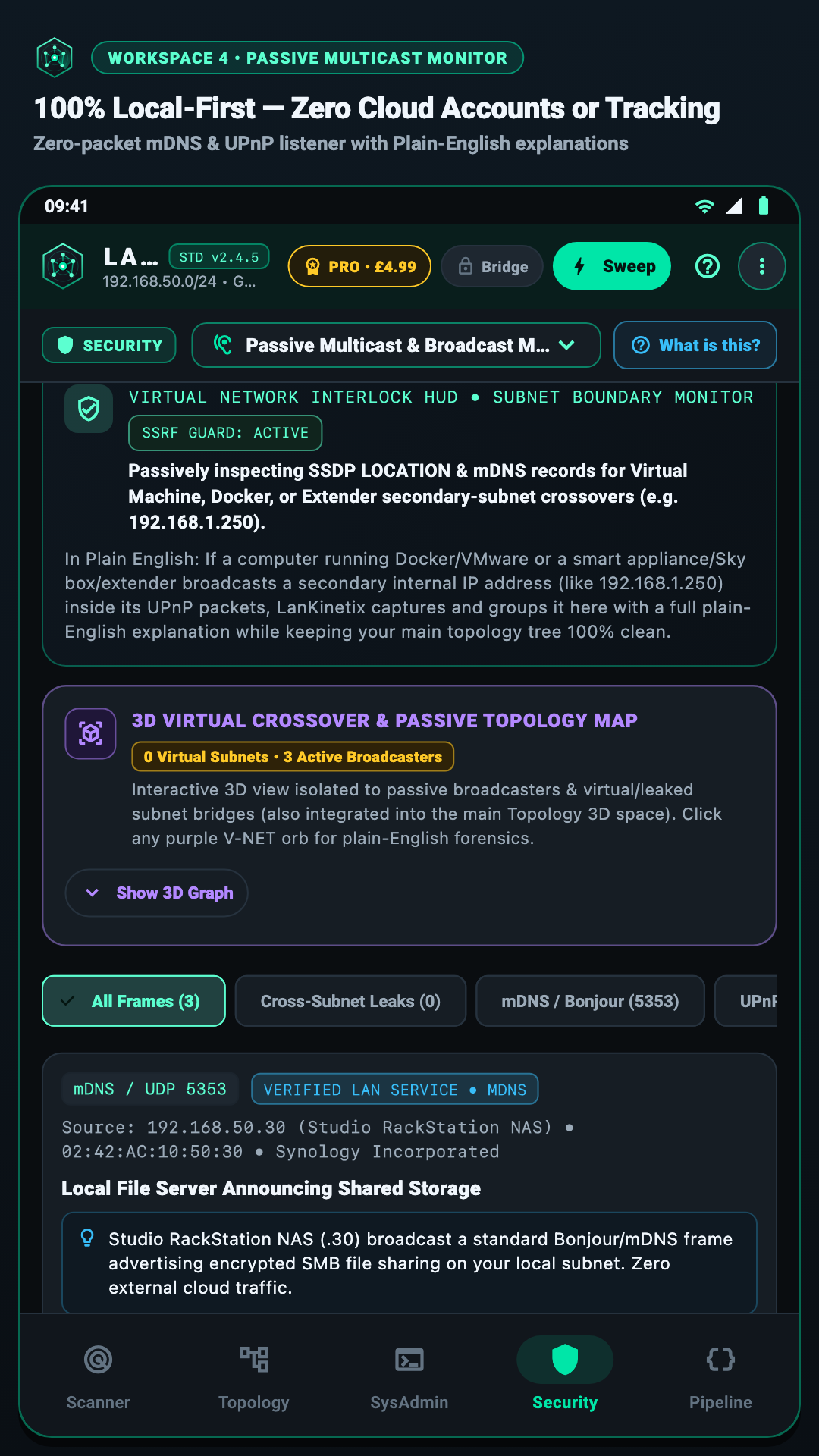
Passive Smart-Home Discovery (mDNS / Bonjour / SSDP / NetBIOS) Included Included Included Included
Automatic Printer & EPOS Safe-Mode (Quarantines ports 8080 / 8081 / 9100–9102) Included Included Included Included
Custom Device Names, Room Tags & Editable Network Header JSON / CLI Config Included Included Included
Companion L2 Bridge QR Pairing (lankinetix.bridge.v3 TLS + HMAC) Host Server Mobile Client Mobile Client Built-In Native
Interactive 2D Force-Directed Network Map — Included Included Included (Widescreen)
Interactive 3D Perspective Orbit Topology Map — Preview Full 60fps 3D Map Full 60fps 3D Map
Foldable & Tablet Dual-Pane Split-Deck Layout — Included Included Multi-Window / Split-Deck
2.4 / 5 / 6 GHz Wi-Fi Channel Equalizer & Best Channel Advice /api/airspace JSON Included Included Included
1 Hz Live Room-by-Room Walk-Test Meter & 24-Room Survey — Live Meter Full 24-Room Logger Full Survey & Heatmap
Security Port Exposure Audit & Rogue Gateway Watch — Core Checks Full Deep Audit Full Deep Audit
3-Zone Glowing WAN Speedometer & Wake-on-LAN (WoL) — Included Included Included
Printable PDF, CSV, JSON & Home Assistant Exports JSON stdout / REST View On-Screen Unlimited 1-Tap Exports Unlimited 1-Tap Exports
2-Tier WAN Privacy Gate, Strict LAN-Only Mode & SSID Redaction 100% Local Loopback/LAN Included Included Included
Coming in v2.5 • Commercial Multi-Tech • £149/yr • 3 Named Technicians

Need White-Label Client Handover Rights for Wi-Fi, Fibre or CCTV Installs?

Free → £9.99 (£4.99 launch offer) live today • £29 Desktop & £149/yr Commercial in v2.5 Early Access Waitlist. No consumer subscription, no account, no telemetry. Opening in v2.5, the Commercial Multi-Tech licence covers up to 3 named technicians, includes the standalone Desktop app, adds white-label client report branding and multi-site survey rights, and is backed by priority UK support. Two avoided callbacks a year pays for the Commercial licence.

Image 1 of 11